
Tech Products That Help You Stay Productive Every Day
Productivity isn’t about buying every gadget on the market; it’s about choosing the right tools that reduce friction, eliminate distractions, and support focus. This guide highlights practical tech products that deliver measurable improvements to your daily workflow, whether you work from home, commute, or balance multiple projects.
Below you’ll find device recommendations, setup tips, and simple habits that make those tools work harder for you. For a deeper look at specific hardware and accessories, explore our Tech & Gadgets collection.
1. Build a Reliable Mobile Workstation
A lightweight laptop with a solid display, long battery life, and enough memory is the backbone of a mobile workflow. Look for an IPS or FHD screen for clear text, SSD storage for fast boot and app launches, and at least 8–12GB RAM if you multitask with browsers, documents, and conferencing apps.
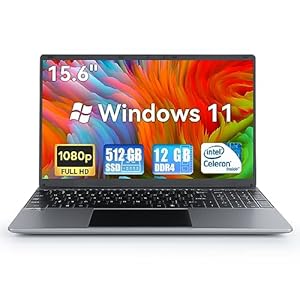
If you need a ready-to-buy option that balances portability and performance, consider a compact 15.6″ laptop configured with ample RAM and SSD storage for daily productivity tasks like spreadsheets, document editing, conferencing, and light photo editing: 15.6″ Laptop — 12GB DDR4, 512GB SSD.
2. Smartphones That Reduce Friction
Your smartphone is often the hub for calendars, email, two-factor authentication, and communication. Prioritize battery longevity, consistent security updates, and a camera that handles document scans and quick visual notes. A device that receives long-term OS and security updates reduces interruptions and the need for frequent replacements.
For a modern Android option with strong battery performance, solid security, and AI-backed productivity features, check the Google Pixel 8 as a practical daily driver: Google Pixel 8 — Unlocked.
3. Backup and Budget Phones for Reliable Connectivity
Not every workflow needs the latest flagship. A reliable, affordable phone can serve as a dependable backup for calls, messaging, and mobile hotspot usage. Keep a spare device charged and ready for travel days or as a failover when your main phone needs repair.
If you prefer a compact, budget-friendly option that still handles core productivity tasks well, consider refurbished or renewed models that offer good value and performance, such as the renewed Apple iPhone SE for everyday reliability: Apple iPhone SE (2nd Generation) — Renewed.
4. Noise-Canceling Earbuds and Headphones for Deep Work
Sound is a major productivity variable. Good active noise cancellation (ANC) keeps low-level office noise or home distractions from breaking focus, and reliable microphone performance makes remote meetings crisp and professional. Look for devices with long battery life, comfortable fit, and multipoint pairing for switching between phone and laptop.
For an all-around in-ear option with ANC, strong call performance, and a long battery life, consider the following earbud set that balances price and features: JBL Tune 230NC TWS — True Wireless ANC Earbuds. Use ANC during focused blocks, and switch to transparency mode for quick interactions without removing the buds.
5. Upgrade Your Desktop: Cases and Cooling for Sustained Performance
When your tasks demand more horsepower—video editing, large data sets, or simultaneous virtual machines—a clean, well-cooled desktop matters. A compact, well-ventilated case that supports modern motherboards and ports simplifies upgrades and maintenance.
For users building a reliable office or creative desktop, a slim micro-ATX / mini-ITX case with accessible ports and good airflow helps you balance desk space and expandability: TGD-1 micro ATX / mini ITX PC Case. Pair it with a solid PSU and quiet fans to keep noise low during long sessions.
6. Portable Tech for Fieldwork and Visual Content
For people who need to capture photos, video, or survey locations, lightweight portable devices speed up workflows and reduce editing time. Stability, quick transfer to your laptop, and automated features (follow-me tracking, waypoint mapping) make a big difference.
A foldable GPS drone with a high-quality camera and easy return-to-home functions is useful for quick aerial shots, property surveys, or creative content generation without a steep learning curve: Foldable GPS Drone with 4K UHD Camera. Use it to gather unique visuals that elevate reports, listings, and presentations.
7. Tech That Supports Focus and Recovery
Productivity isn’t continuous sprinting; it’s focused work punctuated by short recovery. Tools that guide breathing, ambient sound machines, or dedicated focus timers improve attention and reduce burnout. Integrate short breaks and micro-routines to keep output steady across the day.
For simple guided breathing and light/noise support, consider devices designed to help you reset between work blocks: Mindfulness “Breathing Owl” — Guided 4-7-8 Breathing and Noise Machine. Use it for 2–5 minute breathing practices to lower stress and return to deep work refreshed.
Checklist: Quick Setup for a Productive Day
- Charge primary devices overnight; keep a power bank or spare phone ready.
- Use a dedicated workspace with ergonomic setup: monitor at eye level, proper chair height.
- Enable do-not-disturb during focused blocks; use ANC headphones.
- Keep fast storage and automatic backups (cloud or local NAS) for quick file access.
- Schedule short breaks with a breathing or focus device to reset attention.
- Maintain a simple cable and peripheral layout for quick transitions between devices.
FAQ
- What device should I prioritize if I can only buy one?
Start with a reliable laptop or phone that supports your daily apps and has good battery life; a laptop is generally the most flexible for productivity workflows.
- Are noise-canceling earbuds worth it for home offices?
Yes—ANC reduces ambient noise that fragments focus. Choose comfortable buds that pair easily with your phone and laptop.
- How do I keep my devices secure without disrupting workflows?
Enable automatic updates, use a password manager, and set up multi-factor authentication on critical accounts. Keep a backup device available in case of lockouts.
- Can a drone improve productivity?
For roles that require visual documentation or property surveys, a portable drone reduces time spent arranging shots and can provide perspectives that are otherwise difficult to capture.
- How often should I replace productivity tech?
Replace or upgrade when performance slows below your work needs—typically every 3–5 years for laptops and 2–3 years for phones, depending on usage and software demands.
Conclusion: One Practical Takeaway
Choose a small set of reliable devices that cover core needs—compute, communications, focus, and content capture—and optimize how they work together. Invest in a solid laptop, dependable smartphone, quality earbuds, and a couple of targeted accessories (case, drone, or mindfulness device) to remove friction and keep your best work hours truly productive.
Products Featured in This Article

Mindfulness ‘Breathing Owl…
Ultimate 3 in 1 Solution for Mindful Breathing: Rainlax, the 3-in-1 device that combines a breathing…

TGD-1/matx case,itx case,Micro ATX …
Budget design: Pre-mounted holes support mini ITX and m ATX form factor motherboards, and the longest…

Foldable GPS Drone with 4K UHD Digi…
【Ultra Clear 4K Camera】: With 4K Ultra HD Camera, TSRC Q8 guarantees stunning and vivid footage…
15.6” Laptop computer 12GB DD…
【 Massive Storage 】URAO laptops equipped with 12GB RAM (DDR4) and 512GB high-speed SSD, providing enough…

Apple iPhone SE (2nd Era), US Model…
This phone is unlocked and compatible with any carrier of choice on GSM and CDMA networks…

JBL Tune 230NC TWS – True Wi-…
JBL Pure Bass Sound: Smartly designed 10mm drivers enhanced by the Dot form factor deliver JBL's…

Google Pixel 8 – Unlocked And…
Pixel 8 is the helpful phone engineered by Google; the new Google Tensor G3 chip is…